Getting Started
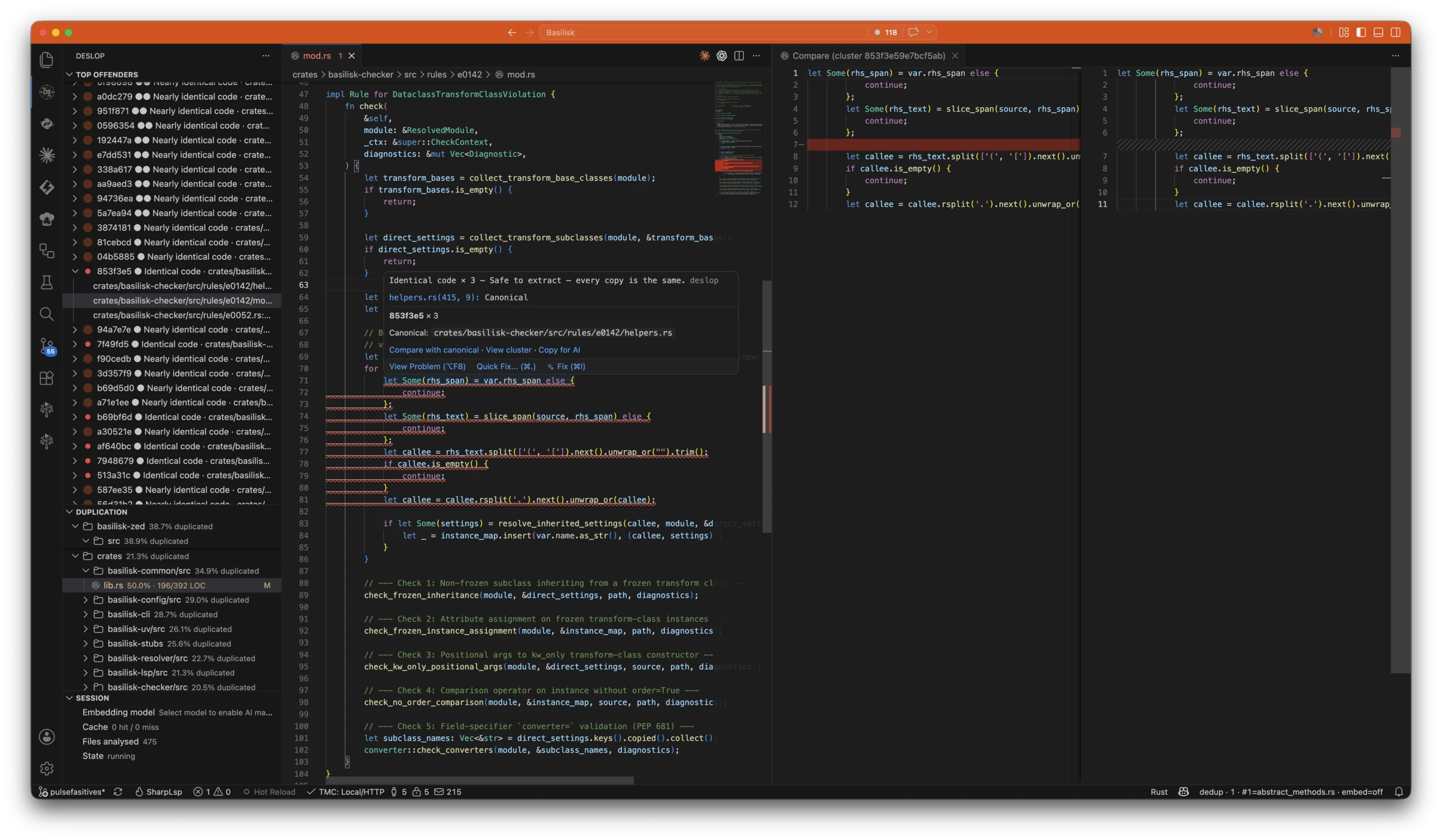
Deslop finds duplicate code across nine languages, ranks what to remove first, and tells your coding agent when similar code already exists. It runs on your workspace and updates as you type — Claude Code, Cursor, Copilot, Continue, Codex, and your editor all read the same live analysis.
The preferred way to install it is the VS Code extension. One install bundles all three surfaces: live editor warnings, the check agents call before writing code, and the CLI.
Install (preferred) — VS Code extension
Install from the VS Code Marketplace:
- In VS Code: open Extensions (
⇧⌘X/Ctrl+Shift+X), search Deslop, click Install. - Command line:
code --install-extension nimblesite.deslop-live - Browser: open the Deslop.live Marketplace page and hit Install.
Then open a supported source file (.cs, .rs, .py, .dart, .js, .mjs, .cjs, .jsx, .ts, .tsx, .php, .fs, .fsx, or .go). The live bubble is active immediately, and the Top Offenders tree populates as the file watcher fires.
The extension bundles native binaries for darwin-arm64, darwin-x64, linux-x64, linux-arm64, and win32-x64 — the right one is selected for you automatically.
Offline or air-gapped? Grab the
.vsixfrom the Releases page or the latest GitHub release, then install it via Extensions panel →…menu → Install from VSIX….
Install the CLI only (Homebrew / Scoop / curl)
macOS / Linux (Homebrew)
brew install nimblesite/tap/deslop
deslop --version
Tap source: github.com/Nimblesite/homebrew-tap.
Windows (Scoop)
scoop bucket add nimblesite https://github.com/Nimblesite/scoop-bucket
scoop install deslop
deslop --version
Bucket source: github.com/Nimblesite/scoop-bucket.
macOS / Linux (curl)
No Homebrew? Pull the archive straight from the latest GitHub release. The snippet resolves the newest version, picks the right platform, verifies the published SHA-256 checksum, and installs the same three binaries the Homebrew formula ships (deslop, deslop-lsp, deslop-mcp). It is fail-closed: if the download or the checksum verification fails, nothing is extracted and nothing is installed:
(
  set -euo pipefail
  base="${DESLOP_RELEASE_BASE:-https://github.com/Nimblesite/Deslop/releases}"
  tag="${DESLOP_TAG:-$(curl -fsSLI -o /dev/null -w '%{url_effective}' "${base}/latest")}"
  tag="${tag##*/}"      # e.g. v1.2.3
  version="${tag#v}"    # e.g. 1.2.3
  case "$(uname -s)-$(uname -m)" in
    Linux-x86_64)  platform=linux-x64 ;;
    Linux-aarch64) platform=linux-arm64 ;;
    Darwin-arm64)  platform=macos-arm64 ;;
    Darwin-x86_64) platform=macos-x64 ;;
    *) echo "unsupported platform: $(uname -s)-$(uname -m)" >&2; exit 1 ;;
  esac
  archive="deslop-${version}-${platform}.tar.gz"
  workdir="$(mktemp -d)"
  trap 'rm -rf "$workdir"' EXIT
  cd "$workdir"
  curl -fsSLO "${base}/download/${tag}/${archive}"
  curl -fsSLO "${base}/download/${tag}/${archive}.sha256"
  if command -v sha256sum >/dev/null; then sha256sum -c "${archive}.sha256"; else shasum -a 256 -c "${archive}.sha256"; fi
  tar -xzf "$archive"
  sudo install -m 755 "deslop-${version}-${platform}"/deslop{,-lsp,-mcp} /usr/local/bin/
  deslop --version
)
Prefer a user-local install? Swap the sudo install line for mkdir -p ~/.local/bin && install -m 755 "deslop-${version}-${platform}"/deslop{,-lsp,-mcp} ~/.local/bin/ (no sudo) and make sure ~/.local/bin is on your PATH.
To pin a specific version instead of the latest, set DESLOP_TAG=vX.Y.Z in your environment before running the snippet.
Direct download
Grab the per-platform archive from the Releases page or the latest GitHub release, then drop the binaries on your PATH.
Run the CLI
deslop .That scans the current directory, writes three reports, and prints the top clusters to your terminal. Everything Deslop writes goes into one .deslop/ directory at the root of the scanned project — add .deslop/ to your .gitignore and you are done:
.deslop/
  deslop-report.json   # canonical, agent-consumable
  deslop-report.txt    # line-oriented plain text
  deslop-report.html   # standalone, human-readable
  logs/                # timestamped run logs
  cache/               # fingerprints and embeddings; safe to delete
--output <prefix> sends the reports (and their logs) somewhere else instead.
Tune the threshold
Default minimum AST node count is chosen so trivial getters do not pollute the top of the report. Override per-run:
deslop . --min-nodes 20Raise it for large codebases where you only want major duplication. Lower it when hunting micro-patterns.
Enable semantic detection — same behavior, different code (Type-4)
Structural and token passes are deterministic and run without network. Same-behavior matches (Type-4) — same behaviour, different syntax — require embeddings. Embeddings are off by default:
deslop . --embeddings autoauto probes the local Ollama provider and falls back with a warning if it's unreachable. Use --embeddings required to hard-fail when the provider can't be contacted. The default model is nomic-embed-text; any Ollama embedding model selectable via --embedding-model.
See How It Works for the fusion math.
Exclude noise
Generated code and build outputs are filtered by default. Add .deslop.toml only for project-specific dependencies, migrations, or training-set code:
[defaults]
exclude = [
  "**/bin/**",
  "**/obj/**",
  "**/node_modules/**",
  "**/target/**",
  "**/*.Designer.cs",
]

report_hide = [
  "**/*.g.cs",
]
exclude skips parsing entirely. report_hide parses but omits from the final ranking — useful for training-set code you still want in the cache.
Gate CI on a duplication threshold
By default deslop exits 0 no matter how much duplication it finds — it reports, it does not judge, so it never breaks a build you did not ask it to gate. Opt into a gate and it exits 3 (failing the build) when repo-wide duplication crosses your ceiling. Pass a flag for a one-off, or commit the ceiling so local runs, CI, and agents all share one number:
deslop . --fail-over 5.0 # exit 3 if more than 5% of analysed LOC is duplicated# .deslop.toml
[threshold]
max_duplication_percent = 5.0--fail-over overrides the config key; --fail-over 0 fails on any duplication; --no-fail-over clears the gate for a single local run. The full exit-code table is in the configuration reference, and the GitHub Action wraps the same gate for CI.