Live MCP + LSP · prevents the copy-paste · reactive on every edit

Your agent is about to copy-paste. Deslop tells it not to.

Deslop is a live LSP + MCP server running in your workspace. It streams real-time duplicate-code signals to Claude Code, Cursor, Copilot, Continue, Codex — and your editor — as code is written. The agent calls find-similar before writing a new function. If the pattern already exists, it reuses the canonical. The copy-paste never happens.

Install from the VS Code Marketplace
code --install-extension nimblesite.deslop-live

The VSIX is the one install that gives you everything — live bubble, LSP server, MCP server, and the deslop CLI in one bundle. JetBrains plugin (Rider, IntelliJ, PyCharm, WebStorm, RustRover, CLion) is in active development; Zed and Neovim on the roadmap. Just want the CLI? brew install nimblesite/tap/deslop or scoop install deslop (after adding the Nimblesite bucket). Current stable release: v0.29.0.

deslop-mcp · live · claude-code
→ agent: find-similar { path: "auth/middleware.ts", range: L42–L71 }
← deslop: streaming clusters…
Nearly identical code [Type-3] fused 0.94
src/utils/legacy_auth.tsL104–L176 src/middleware/auth.tsL12–L84
Same behavior, different code [Type-4] embed 0.82
src/db/connection.rsL40–L55 src/db/pool.rsL12–L27
agent decision: reuse `legacy_auth.verify()` · no copy-paste emitted
Reactive Watcher
On every edit bolt
Languages
C# · Rust · Python · Dart · JS · TS · PHP · F# · Go code
Keystone Tool PREVENT
find-similar

Agent matches a proposed snippet against the live corpus before writing it. Existing pattern wins. No duplicate lands.

Watcher → Editor → Agent 1report

Incremental parse on every change. One in-memory report fans out to every editor surface and MCP client at once via deslop/reportChanged. Stale UI is a correctness bug.

In your editor

One live report, three surfaces.

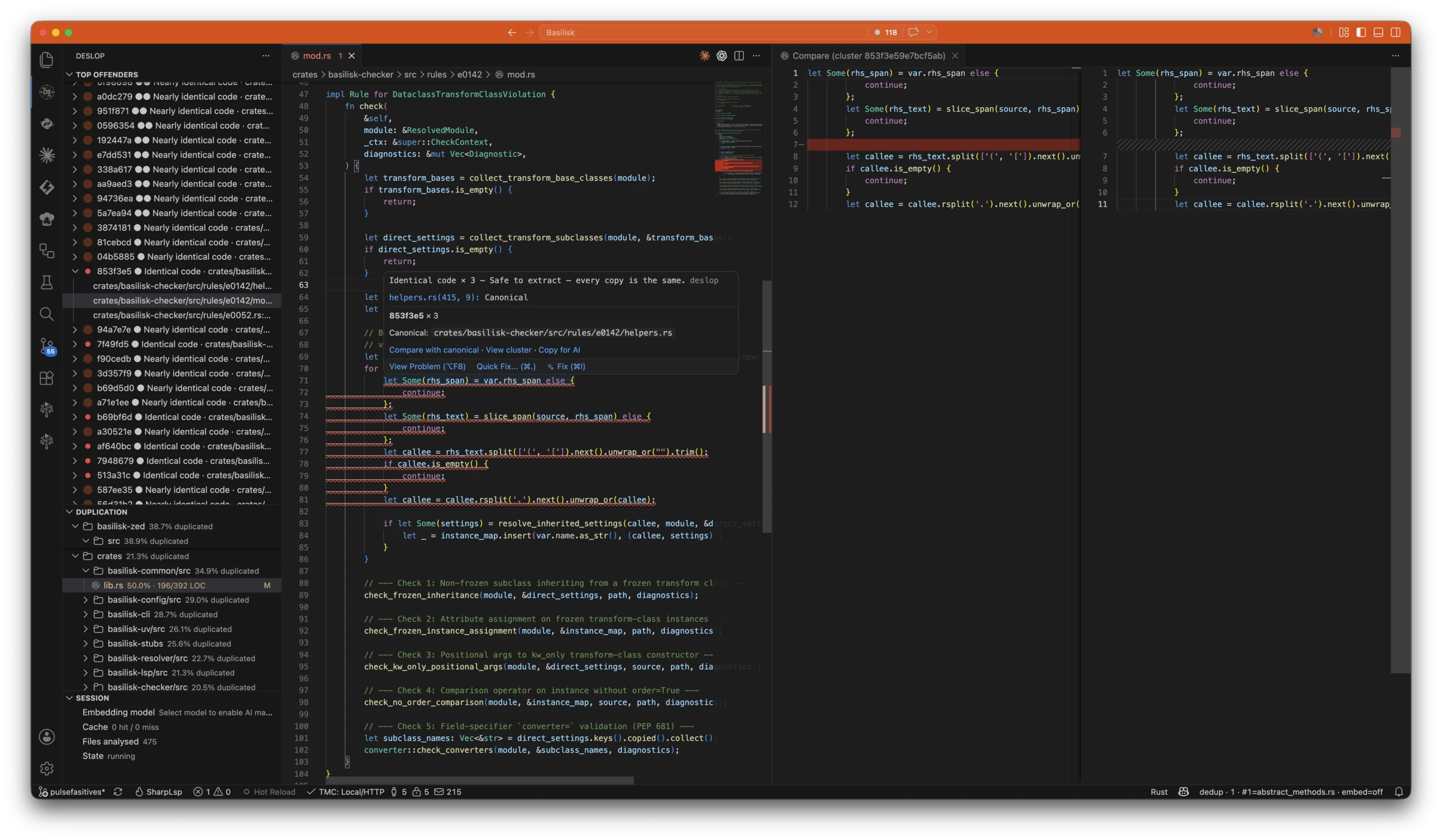
The VS Code extension bundles the LSP and MCP servers and renders the running analysis inline — worst-first clusters in the sidebar, a live clone warning right at your cursor, and a side-by-side diff against the canonical copy. The agent driving your editor reads the same report over MCP.

The Deslop VS Code extension analysing a live workspace: a worst-first Top Offenders tree and a per-directory Duplication breakdown in the sidebar, a live clone warning in the editor with Compare, View cluster and Copy for AI actions, and a side-by-side Compare diff against the canonical occurrence.
  1. Left · sidebar Top Offenders, Duplication, Session

    Top Offenders ranks every clone cluster worst-first — id, severity, plain-English bucket. Duplication breaks the repo down folder-by-folder with a duplicated-percentage on every node. Session shows the live server and the embedding-model picker.

  2. Centre · editor Live clone warning

    The LSP underlines the duplicate as you type, names the canonical copy used as the anchor, and offers Compare with canonical, View cluster, and Copy for AI right on the finding.

  3. Right · diff Compare against canonical

    VS Code's native side-by-side editor lines this occurrence up against the canonical one, matching rows aligned, so you can confirm the duplication before extracting a shared helper.

Install

Get Deslop in your editor.

One extension, published to every registry. Install it from yours below — then, if it earns its keep, leave a review so the next developer finds it too.

  • Visual Studio Marketplace VS Code · GitHub Codespaces

    The full bundle — live bubble, LSP server, MCP server, and the deslop CLI — for VS Code and GitHub Codespaces.

  • Open VSX Registry Cursor · Windsurf · VSCodium

    The same extension for Cursor, Windsurf, VSCodium, Gitpod, and every Open VSX editor.

Community

Building Deslop in the open.

Questions, bug reports, feature requests, or just want to talk duplicate detection and AI codegen? Join the Deslop Discord — users and contributors both welcome.

Join the Discord